Match the message to intent
Read the observed keywords beside a page's screenshots. Explore how a creative message relates to the searches where that page was found.

APPlyzer / CPP research
See the creative. Understand the keyword context. Build a better brief.
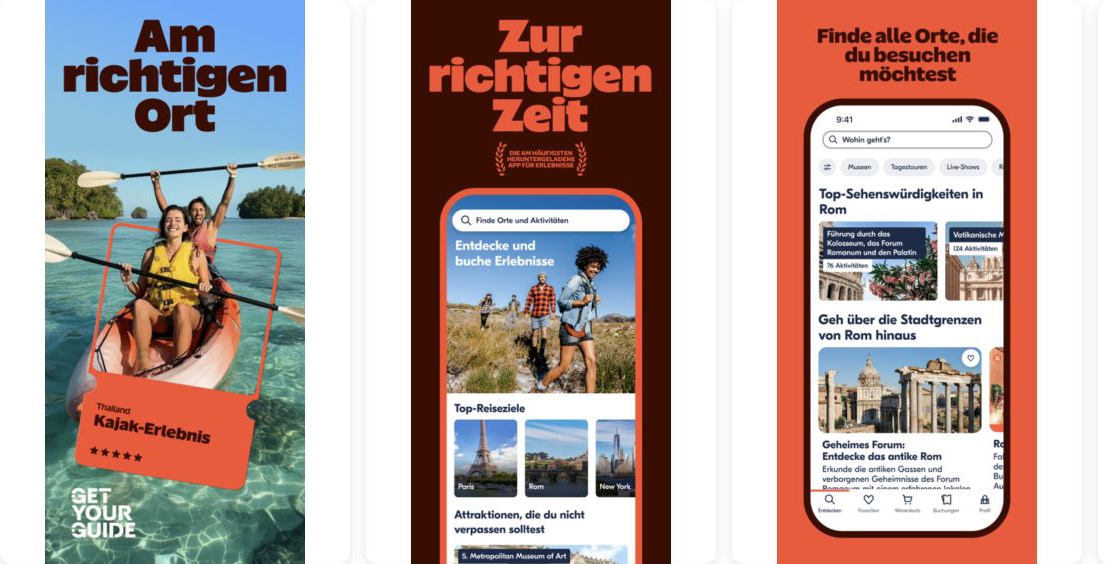
Built for the work
Explore observed Custom Product Page variants and the searches associated with them, then turn competitive examples into testable creative ideas.
Read the observed keywords beside a page's screenshots. Explore how a creative message relates to the searches where that page was found.
Inspect screenshot sequences and available variants side by side. Look for differences in value proposition, visual hierarchy and feature emphasis.
Use relevant examples to define a creative hypothesis for your own app, rather than copying an asset without understanding its context.
The workflow
Set country, device and period. Select organic, paid or both, and choose whether to explore by app or by keyword.
Review the available creatives, observed keywords, discovery dates and page variants. Follow the App Store link when you need the source page.
Compare the examples with your keyword strategy and Apple Search Ads research before deciding what to test in your own store presence.
Know the scope
Yes. The explorer provides organic, paid and combined filters, alongside labels on the observed variants.
No. It provides creative and observed keyword context. You need your own experiment or first-party conversion data to measure lift.
The explorer is scoped to the selected observation window. Extending the period can surface pages discovered earlier; it is not a guarantee of current placement.
Go deeper
Explore observed Custom Product Pages, then decide what deserves a test for your app.

