Investigate brand competition
See which apps appear in auctions around the keywords you track, including terms where your app already ranks organically.

APPlyzer / Auction intelligence
See the competition behind the ad. Not just the app that wins the top spot.
Built for the work
Explore observed auction positions, competing advertisers and keyword-level visibility to give your Apple Search Ads decisions more context.
See which apps appear in auctions around the keywords you track, including terms where your app already ranks organically.
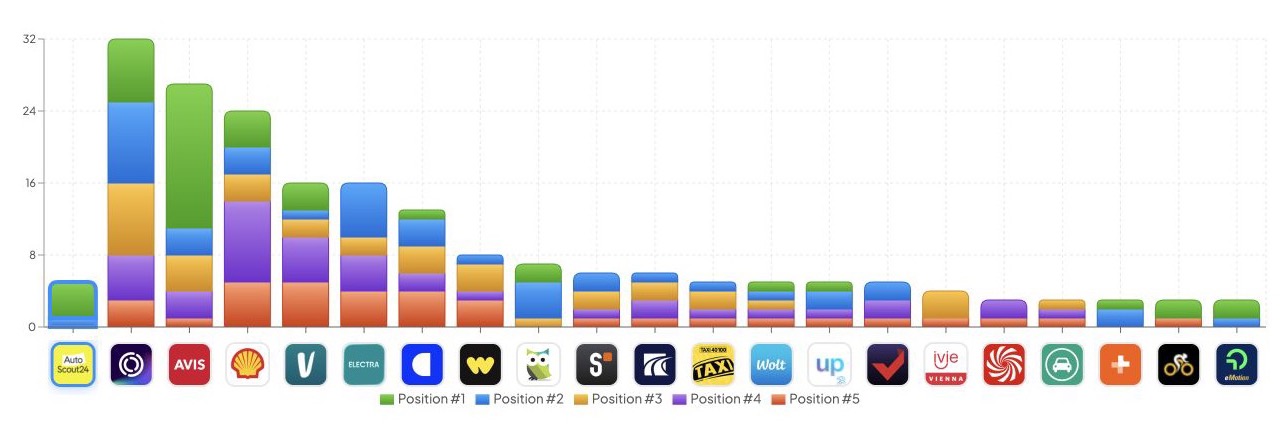
Compare participation across observed auction positions #1–#5 instead of building a strategy around the first visible advertiser alone.
Use keyword-level competition and visibility threats to decide where to investigate your campaigns, creative or organic coverage next.
The workflow
Choose country, device and a time window. Review tracked workspace keywords first, then explore other available keyword views.
Use the auction-position and visible-slot views for their different purposes. Auction position and a visible ad slot are not interchangeable.
Move from the competing-app overview to keyword share of voice, hourly visibility or performance summaries to understand the pattern.
Know the scope
No. APPlyzer provides separate views for observed auction positions and visible slots. The screenshot shows the auction-position chart, not the visible-slot view.
Yes. Ads Insights shows observed advertising activity across tracked keywords and lets you investigate competing apps and keyword-level visibility.
No. Do not interpret observed ad activity or share of voice as an exact spend or acquisition-cost figure.
Go deeper
Explore the observed auction activity around your app's market in APPlyzer.

